
Settings window per area
Where each setting lives – the settings window of each area and company administration under the gear icon.
In allverto, settings live where you need them: everything that belongs to an area is in that area's settings window. Under the gear icon at the top right you only find the company administration.
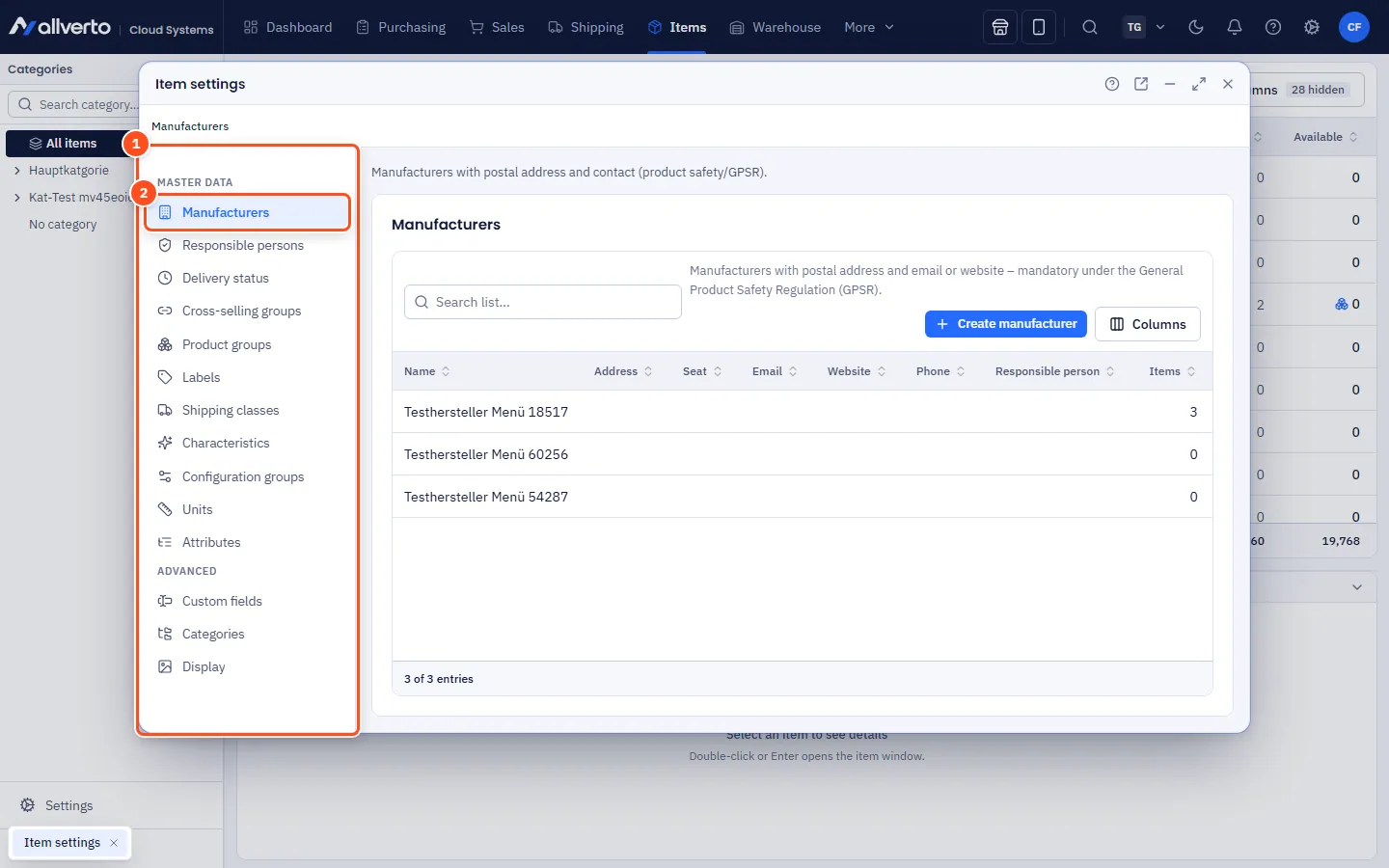
Step by step: open the settings window
- Switch to the area, e.g. Items.
- Click Settings at the bottom of the left sidebar. Alternatively: at the very bottom of the area menu at the top, choose Item settings ▸ and then a menu item or Open window ….
- The window opens with the menu items on the left. Click an item – its settings appear on the right. Use the arrow keys to move between items.
- You save changes in the respective section. Like any other window, you can move it, enlarge it or pop it out into its own browser window.
It's even faster with Ctrl+K: type e.g. "Payment methods" or "Characteristics" and confirm – the right window opens at the right item.
What is where?
| Window | Menu items |
|---|---|
| Item settings | Manufacturers, Responsible persons, Delivery status, Cross-selling groups, Product groups, Labels, Shipping classes, Characteristics, Configuration groups, Units, Attributes, Custom fields, Categories, Display |
| Sales settings | Statuses & text templates, Transaction colours, Payment methods, Delivery options, Custom fields, Stock allocation, Duplicate orders, Vouchers, Returns, Customer groups & labels, Sales channels, POS (branches and registers; below each branch its registers with the tabs General, Devices, Payment methods, Receipt template, Quick keys, TSE, Operators) |
| Purchasing settings | Purchase order approval, Drop shipping, Purchase suggestions |
| Warehouse settings | Warehouses & WMS, Put-away & bin locks, Goods receipt, Batches & best-before dates, Conditions, Scanning & item recognition, Correction reasons, Devices & workstations, Pick list templates, Shipping boxes & carts |
| Shipping settings | Carriers, Freight forwarders, Shipping methods, Packaging, Packing & printing, Delivery & partial delivery, Fulfiller profile & prices |
| Production settings | Work centres & machines, Employees |
| Finance settings | Payment providers & bank accounts, DATEV & accounts, Dunning |
You only see the menu items your role has a permission for.
Administration under the gear icon
The gear icon at the top right opens the Settings page with an overview and its own search field. The search also knows keywords: "IBAN" finds the company details, "Debtor" the number ranges; Enter opens the first hit. The groups:
- General: Companies (Company details, Multiple companies), Number ranges, Taxes & language, Currencies
- Printing & output: Print templates, Email templates, Email sending
- Users & security: Users, roles & permissions, Security, Firewall, Change log, System log
- Data migration: Import/Export, Migration from JTL-Wawi
- Automation: Automations, Sync overview, API & webhooks
- allverto subscription: Subscription & invoices
In the left sidebar of the gear-icon pages, the Search settings field filters the entries.