
Windows: move, detach, remember size
Orders, items, customers and documents open as windows – this is how you move, minimise, maximise and detach them.
Orders, quotes, invoices, customers, items, purchase orders, returns, production orders, settings and other documents open in allverto as windows above the page. The list behind them remains usable, and you can have several windows open at the same time – as in JTL-Wawi.
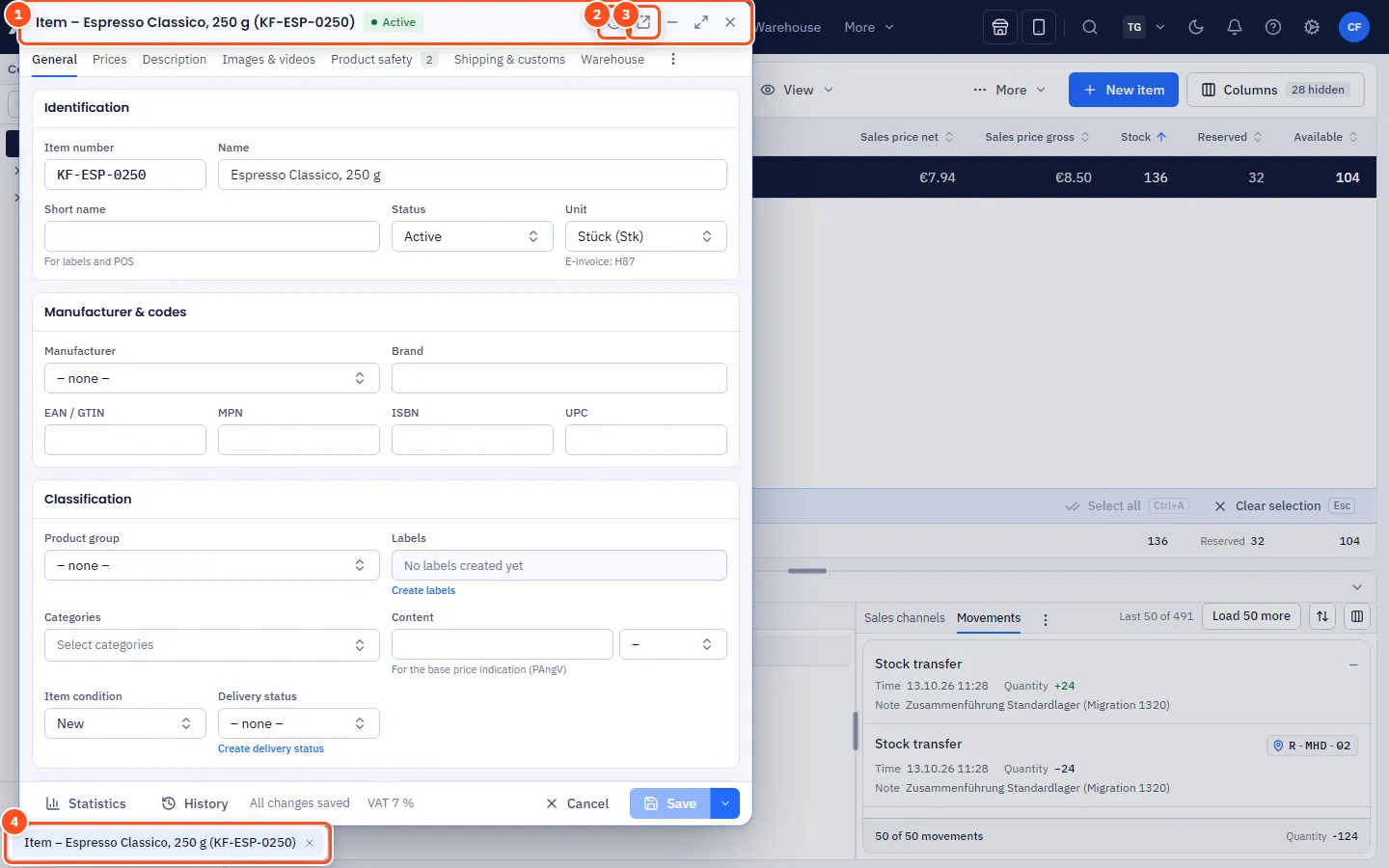
The title bar
On the right of every window's title bar you find:
| Button | Effect |
|---|---|
| ? | Help for this window – in the item window matching the selected tab |
| Open in separate window | Detach the window into its own browser window |
| Minimise | Hide the window; it stays as a chip in the window bar at the bottom |
| Maximise / Restore | Enlarge the window to the full area or back |
| Close | Close the window; allverto asks first if there are unsaved changes |
A dot next to the title indicates Unsaved changes.
Step by step: arranging windows
- Move: grab the title bar and drag.
- Resize: drag an edge or a corner.
- Maximise: double-click the title bar or the Maximise button; doing it again restores the previous size.
- Bring to front: click into the window or click the chip in the window bar at the bottom.
- Close: Close button or Esc in the active window.
If you open the same order or item a second time, the existing window comes to the front – no duplicate is created.
Remembering size and position
allverto remembers size and position per window type (item, order, document, customer, settings …) for your user. So the next item window opens the way you last arranged one. Which windows are open is remembered per browser tab and company – after reloading the page they are back. Windows also stay open when you switch to another page.
Detaching into a separate browser window
Especially handy with two screens:
- Click Open in separate window in the title bar. For orders, this also works with a middle-click on the order number or Ctrl+Enter in the list.
- The window opens as a separate browser window; a chip “detached” appears in the window bar at the bottom.
- Bring back: in the detached window To main window or Ctrl+Shift+H – or right-click the chip → Bring back. Unsaved changes come along.
allverto also remembers the size of detached browser windows per window type.
Who else has the window open?
allverto shows you as soon as you open a record whether someone else has the same record open – not only when you save. This applies to orders, quotes, invoices and draft invoices, credit notes, items, customers, suppliers, purchase orders, subscriptions, returns, production orders and the other document windows, including detached browser windows.
- Notice at the top of the window: "Anna Müller has had this order open since 10:42." If she has unsaved changes, the notice turns yellow: "Anna Müller is editing this order right now …".
- Initials of the others appear as small circles in the window; hover over them to see the name and time. Yellow means: editing right now.
- Your own second window: if you already have the same record open in another window or browser tab yourself, it says "You already have … open in another window".
- On your first change allverto asks once if someone else currently has unsaved changes: Edit anyway or Discard change.
- If someone else saves while you have unsaved changes, "… has just saved this order" appears with Reload. Without changes of your own, the window quietly loads the new version.
The display updates live within a few seconds. Nothing is locked – as in JTL-Wawi, both people can carry on working. Whoever saves last overwrites the other person's changes; for orders, quotes, draft invoices, items, customers and suppliers allverto also reports this when saving (see below).
Frequently asked questions
I can't see a window any more.
Look in the window bar at the bottom: minimised windows are there as chips. You bring detached windows to the front by clicking their chip.
Two colleagues are editing the same order – what happens?
Both see as soon as they open the window that the other person has it open or is editing it right now (see Who else has the window open?). If someone else has saved in the meantime, allverto reports this when saving ("has been changed by … in the meantime") and offers Reload or Save anyway. That way nobody overwrites other people's changes unnoticed.