
OSS report
EU distance sales to consumers per country of destination and tax rate – with delivery threshold, Excel export and CSV file for the OSS return in the BZSt portal.
If you sell to consumers in other EU countries, once you exceed €10,000 a year you have to pay the VAT of the country of destination and report it via the One-Stop-Shop (OSS). The OSS report summarises these sales for you. You'll find it under Finance → OSS report (group Export & reporting).
Before you start
- Anyone with the View financial data permission can view it (e.g. owner, Administration, Accounting).
What the report shows
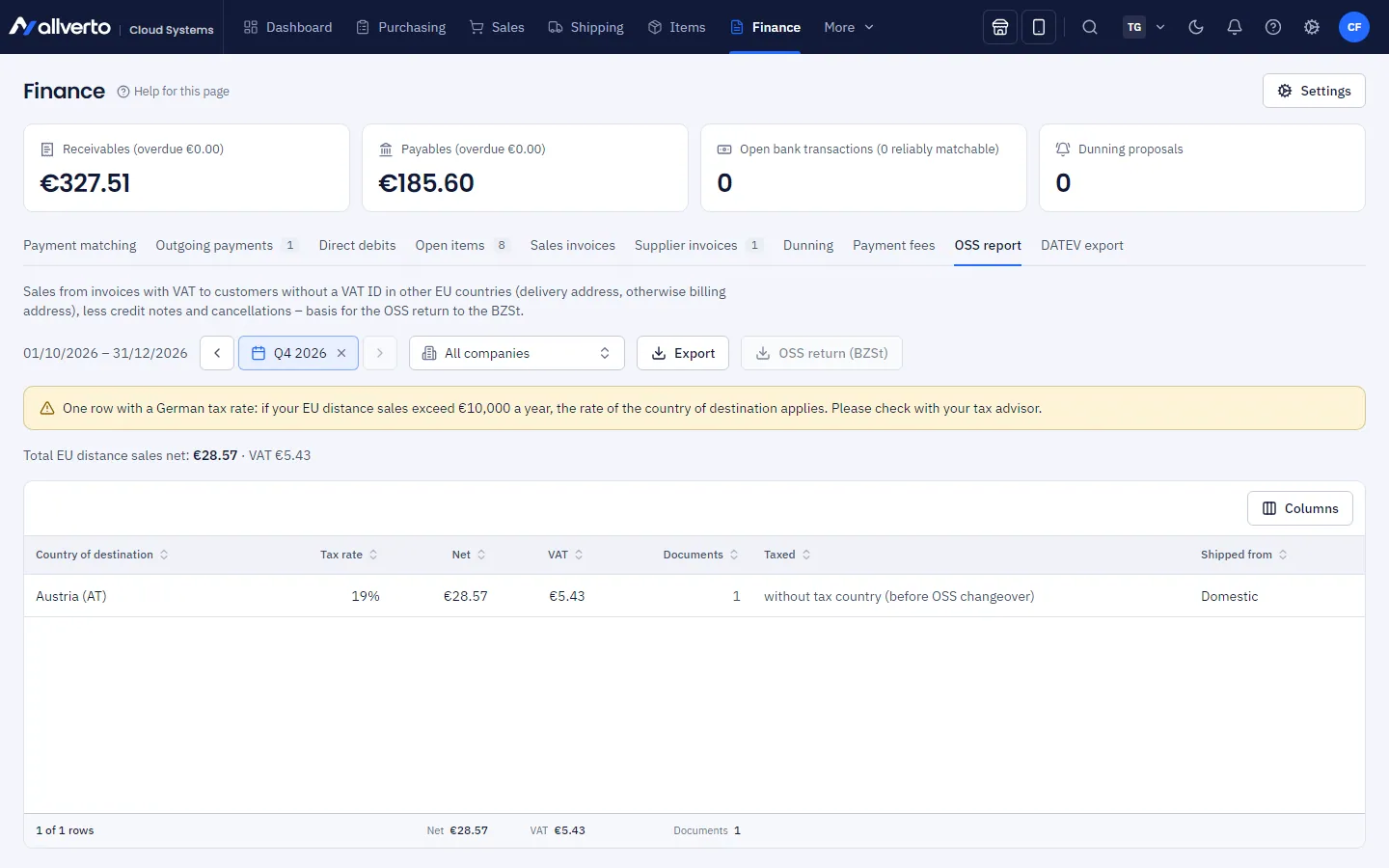
The current quarter is preselected; use the period selector on the right to choose another one (OSS is reported quarterly). If you work with several companies, use the company filter to limit the report to one company. The table has one row per country of destination, tax rate and shipping country:
| Column | Meaning |
|---|---|
| Country of destination | Country of the delivery address (otherwise the billing address) |
| Tax rate | VAT rate applied |
| Net | Total net, less credit notes and cancellations for invoices of the same quarter |
| VAT | Total VAT |
| Documents | Number of invoices and credit notes |
| Taxed | OSS (destination country) – tax of the country of destination, belongs in the OSS return; Domestic (below threshold) – German tax as long as the delivery threshold has not been exceeded; without tax country (before OSS changeover) – older documents |
| Shipped from | Country the goods were shipped from (Domestic or e.g. a fulfilment warehouse abroad) |
Above the table you see the Total EU distance sales net and the total VAT.
The report includes invoices with VAT to customers without a VAT ID in other EU countries. Invoices to businesses with a VAT ID (reverse charge or intra-Community supply) are not included.
allverto converts documents in a foreign currency to euros using the ECB rate of the last day of the period, as required for the OSS return (Art. 366 VAT Directive, Section 16 (6) UStG). The rates used are shown above the table. If an ECB rate is missing, allverto uses the document's rate and points this out.
Corrections of earlier quarters
Credit notes and cancellations for invoices from an earlier quarter do not belong in the total of the current quarter but are a correction of the original period. allverto therefore shows them separately in a yellow box above the table – per original quarter, country and tax rate with net, tax and number of documents. They are included neither in the total nor in the BZSt file. Enter them in the BZSt portal as a correction of the return for the original quarter.
Delivery threshold
allverto includes the EU distance sales of the previous year and the current year. If you are not (yet) registered for OSS, a yellow notice appears:
- Delivery threshold almost reached – with the share of the €10,000 and the totals of both years.
- Delivery threshold exceeded – new transactions to consumers in the EU now use the rate of the destination country. Register for the OSS scheme with the Federal Central Tax Office (Bundeszentralamt für Steuern, BZSt).
If the notice "… with German tax rate" appears, the report contains older documents without a tax country at 19 % or 7 %. Check with your tax advisor whether they were taxed correctly.
Export and report
| Button | Result |
|---|---|
| Export | The whole report as CSV (semicolon-separated, opens directly in Excel) with a totals row |
| OSS return (BZSt) | CSV in the BZSt import format (OSS tax return, EU scheme, version 2.0) – only the OSS (destination country) rows, summarised per country, tax rate and shipping country |
Upload the BZSt file in the BZSt portal under Datei hochladen (upload file) and check the return there before you submit it. If the VAT ID for a shipping country abroad is missing, allverto shows a notice when creating the file.
Frequently asked questions
My EU sales are missing from the report.
Check whether they are invoices (orders without an invoice don't count), whether the customer has no VAT ID, whether the invoice date is within the selected period and whether the company filter is right.
How do I get the figures for accounting?
Revenue at foreign tax rates goes to the OSS (EU distance sales) account with the DATEV export, provided you have entered it in the finance settings under DATEV & accounts.