
Reports: revenue, items, warehouse, shipping, packaging
allverto's ready-made reports – revenue and margin, ABC/XYZ analysis, stock turnover and slow movers, shipping performance, packaging consumption for LUCID – with period, channel filter and CSV export.
Under Reports in the top bar you'll find ready-made reports on revenue, items, warehouse, shipping and packaging. In the drop-down menu you jump directly to Revenue, Items, Warehouse, Shipping, POS or Custom reports. You don't need to set anything up – the figures come straight from your orders, invoices and stock postings.
Before you start
- Viewing is allowed for Owner, Administration, Purchasing manager, Sales, Accounting and Read only (permission View reports).
- For the margin, your items need a purchase price at the supplier (see Suppliers).
Period and channels
At the top right you choose the Period (default: the last 90 days) and optionally individual Sales channels (empty = All channels). The selection applies to the Revenue & margin, Items, Warehouse and Shipping reports – the Packaging and Custom reports tabs have their own period. Every report can be exported for Excel with Download as CSV (semicolon, decimal comma).
All amounts are in euros. allverto converts orders in foreign currencies (e.g. CHF, USD) at the order's exchange rate – headline figures, channels, item revenue and gross profit therefore match.
The reports
Revenue & margin
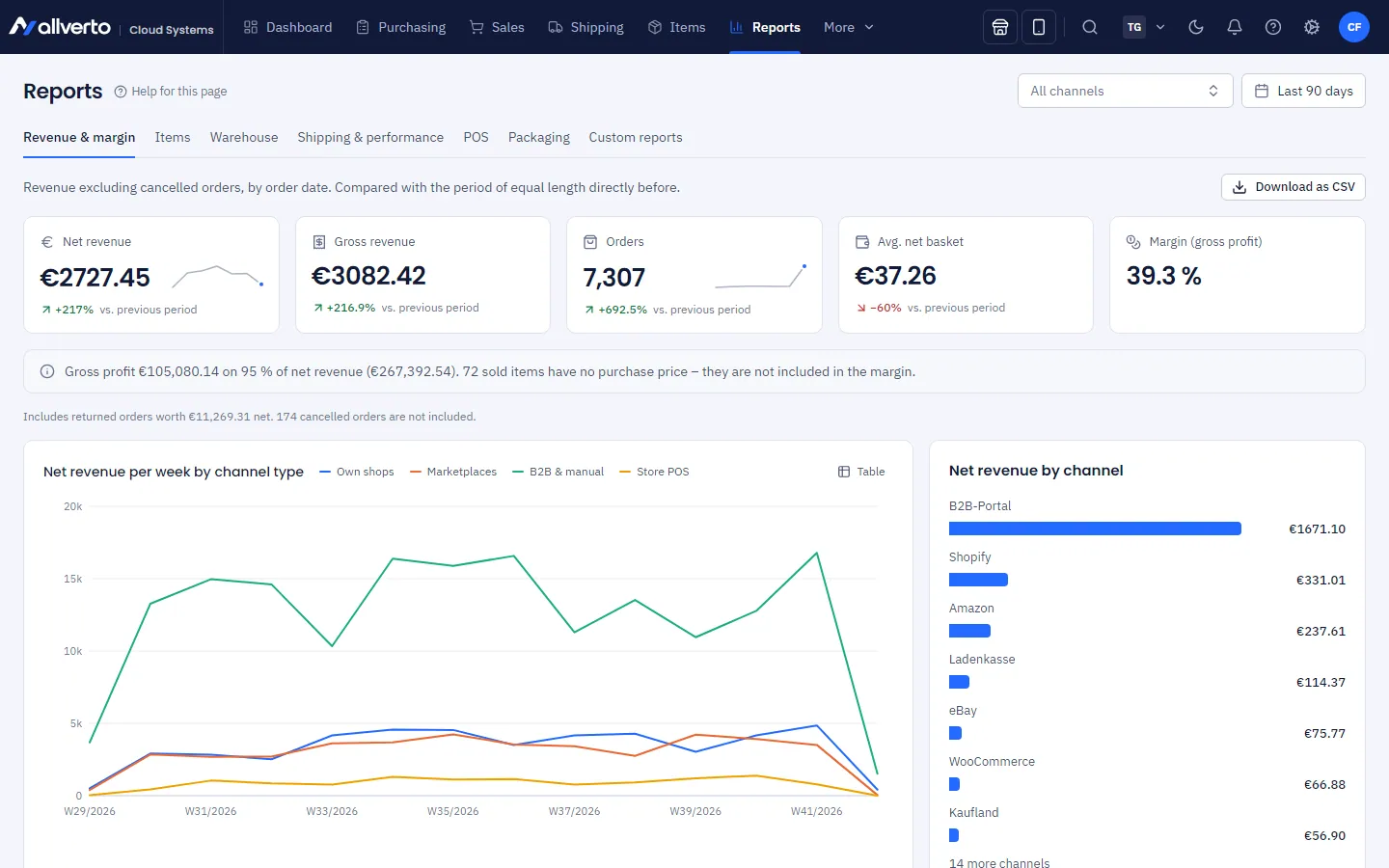
- Key figures Net revenue, Gross revenue, Orders, Avg. net basket and Margin (gross profit) – each compared with the previous period of the same length.
- Net revenue by channel: right-click a channel → analyse only this channel or open the channel's orders.
- Cancelled orders don't count. Margin = net revenue − quantity × purchase price (preferred supplier, otherwise cheapest supplier). If the purchase price is missing, Purchase price missing is shown.
Items
- Top items by revenue or quantity (Rank by).
- ABC by revenue: A = items that together bring 80 % of revenue, B = up to 95 %, C = the rest.
- XYZ by predictability: X = steady sales, Y = fluctuating, Z = sporadic (from four full weeks in the period).
- ABC/XYZ matrix: clicking a cell filters the table below. Right-clicking an item opens it or shows orders containing this item.
- The Items without sales switch shows or hides active items without sales in the period in the table (default: on).
- For large ranges the table shows the 1,000 top-selling items; a note above it gives the total. Key figures, top items, matrix and Pareto curve always cover all items; Download as CSV contains all items (same filter as the table).
Warehouse
- Stock value, Stock turnover in period and Coverage (how long the stock lasts at the current outflow rate), plus the Shortest coverage list.
- Slow movers: items with stock but no outflow for a selectable number of days (Slow movers from days without outflow, default 90).
- Outflow means sales and consumption: picking for shipping, sales at the POS, material issues in production and packaging used for shipping. Transfers, shipments to a fulfiller, supplier returns, corrections and stocktaking do not count.
- For large ranges the table shows the 1,000 items with the highest stock value; key figures, slow movers, shortest coverage and the CSV download cover all items.
- Occupancy by warehouse and zone – right-click for Open storage bins.
- Right-click an item: Open item, Orders with this item, under Purchasing the Purchase suggestions or Purchase orders, under Warehouse Correct stock… or the Warehouse overview (item's bins). Entries your role has no right for are not shown.
- The channel filter does not apply here.
Shipping & performance
- Shipped orders per day or week, Open orders (now).
- Lead time (median) and Lead time (90 % faster than) from receipt to shipping.
- Shipped on order day as a percentage.
- Lead time distribution.
- Picking performance per employee – from the warehouse app's pick lists.
Packaging
The Packaging tab shows which packaging was used for shipping (per label or delivery; cancelled shipments don't count) – the basis for the German Packaging Act (VerpackG):
- Key figures Packaging, Booked from stock, Cost (purchase) and Packaging weight in their own period (default: last 30 days).
- Packaging consumption with Grouping Per packaging, Per shipping method or Packaging × shipping method.
- LUCID data report for a calendar year: mass in kg per material type, either All customers or Consumers only, with CSV for LUCID and the Breakdown per packaging.
Packaging without a material specification is missing from the report – add the material under Shipping → Settings → Packaging. Packaging subject to system participation is packaging that typically ends up with private end consumers; check the values before reporting.
POS
If you have the permission for POS reports, there is also the POS tab with the daily revenue per register and payment method (see Register closing).
Frequently asked questions
The figures differ from my accounting.
The reports calculate with orders by order date, not with invoices by invoice date. For accounting, use the open items and the DATEV export.
I'm missing a specific report.
Build it yourself – see Create a custom report.